Financial Statements: How does it work?
Basically, the Financial Statements tab in Dashboards helps you analyze and compare your financial performance effortlessly.
Let's discover how it works in simple terms 💪
Step 1: Choose Your Statement
You can start by selecting the financial statement you want to analyze - Profit & Loss, Balance Sheet, or Cash Flow Statement. Each one shows different aspects of your business's finances.
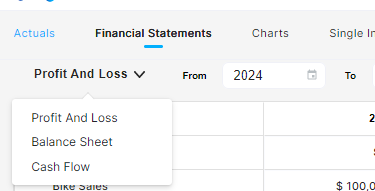
Step 2: Select the Period
Pick the timeframe you want to review by selecting the start and end month and year.
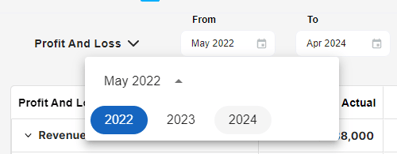
In addition to report frequency, you can also view your actual financial statements on a comparative, monthly, quarterly, and annual basis.

Step 3: Comparative view
Now comes the exciting part! You'll see a detailed comparison of your actual results with your plan and previous periods. On one screen, you can analyze your Actual performance versus your Forecast, versus the Previous Period & versus the Previous Year.
Except for Actuals, the rest of the comparative periods show $ difference and % difference information 💪
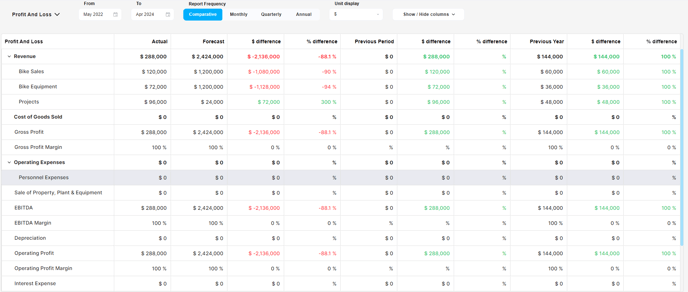
Step 4: Handling Zeros
👀 If you see many zeros, it means you haven't entered actual results for those periods.
No worries! You can input the actual data in the Actuals section. This way, those zeros will be replaced with meaningful numbers, making your analysis more accurate.

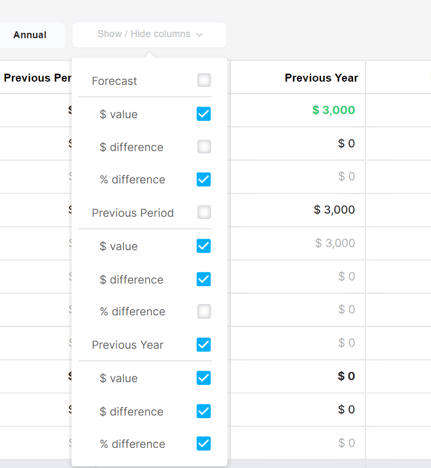
Step 5: Customize the View
You can hide any columns you don't want to see, focusing on the areas that matter most to you. This allows for a cleaner and more personalized analysis.
🔎 You can easily export them as PDF or Excel files. This makes collaboration and record-keeping hassle-free.
❣️ To gain a visual understanding of how Dashboards Financial Statements work, check out our informative video.
Related Articles
How does the Actuals section work in Dashboards?
In Modeliks Dashboards, the section called Actuals allows you to input the financial results of your business. Actual financial results are the real financial results of your business for the previous months and years, as recorded in your accounting ...How to select Single Indicators in Modeliks?
Indicators serve as measurable metrics that offer insights into various aspects of a business's financial performance. In Modeliks, under the Dashboards module, you can easily access the "Single Indicators" section, which contains all the relevant ...What kind of Charts are available?
Discover revenue breakdowns, cost analysis, asset and liability insights, and the popular bridge & waterfall charts. The beauty of these charts lies in their automatic generation, making them incredibly convenient for you. With just a few clicks, you ...How to create a Custom KPI List?
Custom KPIs offer valuable insights tailored to your business's unique value drivers and indicators. KPI stands for Key Performance Indicators - Custom KPIs offer valuable insights tailored to your business's unique value drivers and indicators. ...How to create Custom Dashboards?
Streamline your financial reporting by creating personalized dashboards for charts that matter most to you. With the Custom Dashboards, you have the power to add only the charts that you want to regularly monitor, creating a customized summary ...